
Webhooks
Get told when a post is published or fails, instead of checking again and again.
A webhook is a URL on your server. When something happens, Bulkit sends a
POST request to that URL with the details.
Events
| Event | When it is sent |
|---|---|
post.published | A channel's post is fully live. |
post.failed | A channel's post did not go out at all. |
post.partially_failed | A thread stopped halfway: some blocks are live, some are not. |
channel.needs_reconnect | An account must be reconnected in the app before it can post again. |
post.* events are sent once per channel. A post sent to 3 channels
gives you 3 events. data.channelId tells you which channel it is about.
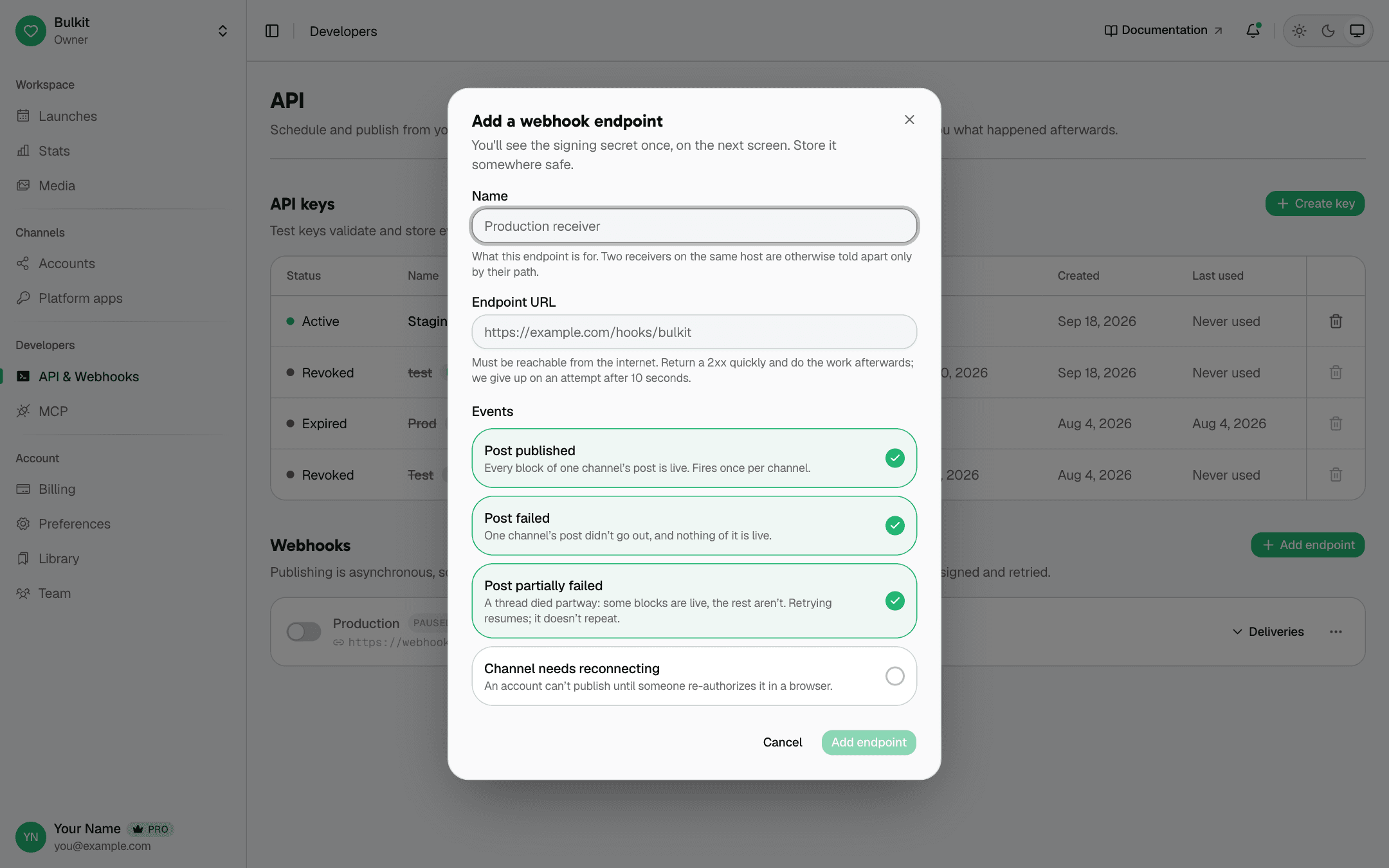
Add a webhook
- Open Developers → API & Webhooks.
- Under Webhooks, click Add endpoint.
- Enter a name, your URL, and pick the events you want.
- Click Add endpoint, then copy the signing secret. It is shown only once.
curl -X POST "$BULKIT_URL/webhooks" \
  -H "x-api-key: $BULKIT_API_KEY" \
  -H "Content-Type: application/json" \
  -H "Idempotency-Key: $(uuidgen)" \
  -d '{
    "url": "https://example.com/hooks/bulkit",
    "description": "Production",
    "events": ["post.published", "post.failed", "post.partially_failed", "channel.needs_reconnect"]
}'{
"secret": "whsec_2f4a…",
"endpoint": { "id": "…", "url": "https://example.com/hooks/bulkit", "status": "enabled", "…": "…" }
}Save secret now. No route will show it again.
Your URL must start with https:// and be reachable from the internet.
Test keys never publish, so they never send webhooks. To test your webhook from start to end, use a live key and an account you don't mind posting to.
What you receive
POST /hooks/bulkit
Content-Type: application/json
x-bulkit-signature: t=1755432000,v1=6f1a…
x-bulkit-event-id: 0f9c8e2a-…
x-bulkit-event-type: post.published
x-bulkit-attempt: 1
{
"id": "0f9c8e2a-…",
"type": "post.published",
"createdAt": "2026-10-15T09:00:04.000Z",
"data": {
"channelId": "chn_x",
"platform": "x",
"blocksPublished": 1,
"blocksTotal": 1,
"error": null,
"post": { "id": "…", "status": "published", "channels": ["…"] }
}
}data.post is the full post, the same as GET /posts/{id} returns. You do not
need to call the API again.
Check the signature
Always do this. Anyone on the internet can send requests to your URL. The signature proves the request came from Bulkit.
- Read the
x-bulkit-signatureheader. It looks liket=<time>,v1=<signature>. - Build the text
<t>.<raw body>— use the raw request body, exactly as received. Do not parse and re-encode the JSON. - Compute
HMAC-SHA256of that text with your secret, as hex. - Compare it with
v1using a constant-time comparison. - Reject the request if
tis more than 5 minutes old.
import crypto from "node:crypto";
import express from "express";

const app = express();
const SECRET = process.env.BULKIT_WEBHOOK_SECRET;

// express.raw keeps the body as bytes, so the signature matches.
app.post("/hooks/bulkit", express.raw({ type: "application/json" }), (req, res) => {
  const header = req.get("x-bulkit-signature") ?? "";
  const parts = Object.fromEntries(header.split(",").map((p) => p.split("=")));
  const rawBody = req.body.toString("utf8");

  const expected = crypto
    .createHmac("sha256", SECRET)
    .update(`${parts.t}.${rawBody}`)
    .digest("hex");

  const valid =
    parts.v1 &&
    expected.length === parts.v1.length &&
    crypto.timingSafeEqual(Buffer.from(expected), Buffer.from(parts.v1));
  const fresh = Math.abs(Date.now() / 1000 - Number(parts.t)) < 300;

  if (!valid || !fresh) return res.status(400).send("bad signature");

  // Answer fast, then do the work.
  res.sendStatus(200);

  const event = JSON.parse(rawBody);
  handleEvent(event); // your code — dedupe on event.id
});
Retries and duplicates
- Answer with a
2xxfast, then do the work. Bulkit waits at most 10 seconds. - If you don't answer
2xx, Bulkit retries: after 10s, 20s, 40s… up to once an hour, for about 5 hours. - Redirects (
3xx) are not followed. They count as a failure. - You may get the same event twice. Use the event
id(also inx-bulkit-event-id) to ignore duplicates.
When deliveries fail
- See every attempt in the app (Deliveries) or with
GET /webhooks/{id}/deliveries. - After 5 failed events in a row, Bulkit turns the endpoint off. Fix your server, then turn it back on with the switch in the app, or:
curl -X PUT "$BULKIT_URL/webhooks/WEBHOOK_ID" \
  -H "x-api-key: $BULKIT_API_KEY" \
  -H "Content-Type: application/json" \
  -d '{ "enabled": true }'
Other webhook routes
| Route | What it does |
|---|---|
GET /webhooks | List your endpoints, including disabled ones. |
GET /webhooks/{id} | Get one endpoint. |
PUT /webhooks/{id} | Change the URL, events or on/off. Only the fields you send change. |
DELETE /webhooks/{id} | Delete it, with its delivery history. To pause, turn it off instead. |
POST /webhooks/{id}/roll-secret | Get a new secret. The old one stops working right away. |
After you roll the secret, accept both the old and the new secret for a few minutes. Retries that were already on their way may use either one.